Construct3Plugin ImGui
A downloadable tool
ImGui Plugin Construct 3
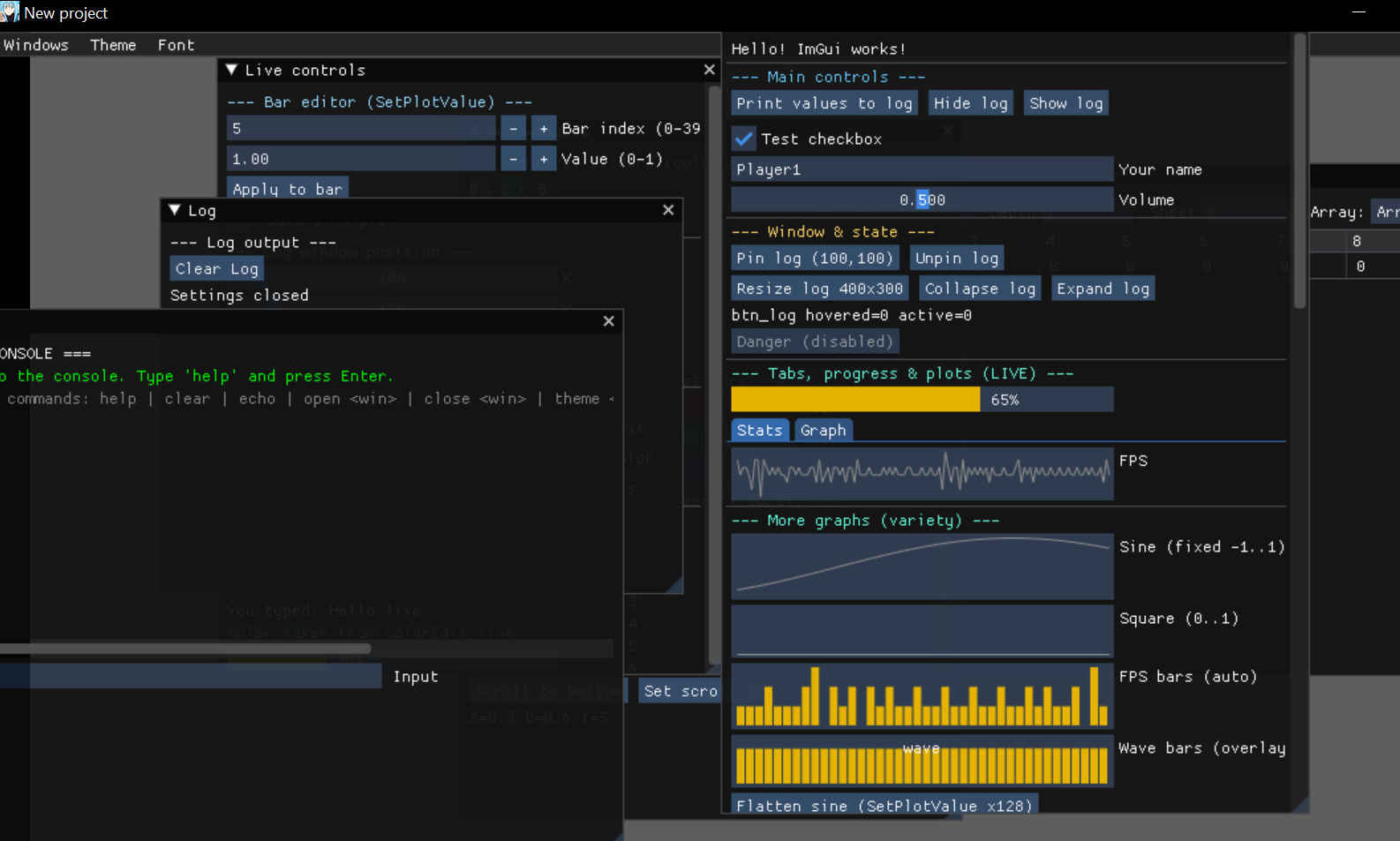
Dear ImGui integration for Construct 3 with overlay rendering.
What this is
Dear ImGui is a library for debug/tool interfaces. The key difference from regular UI: the whole interface is rebuilt every frame from code/events instead of being created once. That gives you full control over state — the UI is always in sync with the game.
This plugin embeds ImGui into Construct 3 as a transparent DOM overlay on top of the game canvas. Everything is driven from events; under the hood it's real ImGui with all its features.
How it works
The plugin has two parts: Runtime (in the web worker, processes events) and DOM side (in the main thread, renders ImGui and captures input). Mouse/keyboard input is passed through to the game automatically — if ImGui isn't capturing anything, events go to Construct as usual.
One plugin instance per project (single global).
Actions, conditions & expressions
Window
Actions
Create window— create a window by ID.menuBarenables the built-in menu bar.Set window open— open/close.Set window position / size— set position or size.alwaysflag = apply every frame (otherwise the window can be dragged).Unlock window position / size— remove the position/size lock.Set window collapsed— collapse to title bar.Clear window— remove all content.Clear window text— remove only texts (those without id).Remove window— delete the window entirely.
Conditions
Is window open / collapsed— state check.On window opened / closed— trigger on open/close (from user or from code).
Widgets
Buttons
Add button— regular button.Add invisible button— invisible clickable area (width × height).Add selectable— list item with hover.
Input fields
Add input text— single-line input.Add input text (flags)— flags:password,readonly,numbers,hex,uppercase,nospaces,enter.Add input int / float— numeric fields with +/-.Add multiline input— multiline field (width × height).
Sliders
Add slider float / int— horizontal.Add VSlider float / int— vertical (width × height).Set slider color— tint a slider with a hex color.Add drag int / float— drag widgets (drag the value with the mouse).
Selection
Add checkbox— checkbox.Add combo— dropdown list (items separated by|).Add list box— visible list (heightInItems = visible rows, -1 = auto).Add radio group— radio buttons.Add color edit 3 / 4— RGB/RGBA color picker.
Other
Add progress bar— progress bar (fraction 0..1, overlay — text on top).
Conditions
On button clicked,On invisible button clicked,On selectable clicked,On checkbox changed,On input text changed,On slider changed,On drag changed,On combo changed,On list box changed,On radio changed,On color edit changed,Is checkbox checked.
Expressions
CheckboxValue,InputTextValue,InputIntValue,InputFloatValue,InputMultilineValue,SliderFloatValue,SliderIntValue,VSliderFloatValue,VSliderIntValue,DragIntValue,DragFloatValue,ColorEditR/G/B/A,ColorEditValue(hex),ComboValue,ComboText,ListBoxValue,ListBoxText,RadioGroupValue,RadioGroupText.
Text
Add text— plain text (textId is needed for hover triggers).Add colored text— colored text (hex#RRGGBBor#RRGGBBAA).Add wrapped text— with auto word wrap.Add bullet / bullet text— list marker.
Layout & Containers
Positioning
Add separator,Add same line(offset/spacing),Add spacing(count times),Add new line,Add indent / unindent.
Containers
Begin child / End child— nested scrollable window (width/height = 0 means stretch).Begin child (flags) / End child— flags via|:borders,padding,resizex,resizey,frame,hscroll,nowheel.Set child scroll/Scroll child to bottom— scroll control.Begin disabled / End disabled— everything between is inactive.Add tree node / tree pop— collapsible node.Add collapsing header— like tree node but full width.Begin tab bar / tab item / End ...— tabs.
Tables
Begin table / End table— start/end (columns = column count).Table setup column— declare a column (before HeadersRow).Table headers row— draw headers.Table next row / next column— move between cells.
Conditions
On node opened / closed,Is node open.
Expression
NodeOpen.
Menus
- In window:
Add begin menu bar / end,Add begin menu / end,Add menu item. The window must be created withmenuBar=true. - Main menu (top of screen):
Set main menu bar,Add main menu,Add main menu item,Add main end menu,Clear main menu bar.
Condition
On menu item clicked.
Popups & Tooltips
Add begin popup / end popup— popup container.modal= modal window.Open popup / Close popup— programmatic control.Set item tooltip— attach a tooltip to a widget by id.Show tooltip / Hide tooltip— tooltip following the cursor.
Conditions
Is popup open,On popup closed.
Plots
Add plot lines— line graph. Values = CSV of initial data. Min/Max = 0 means auto mode. Height in pixels.Add plot histogram— bar histogram. Plus overlay and maxBars.Push plot value— add a point at the end.Set plot value— set value by index.
Expression
PlotValue(plotId, index).
Push plot value in Every tick.Console
Create console— create a console widget (log + input field).Console print— print a line (hex color).Console clear— clear.
Condition
On console submitted(Enter in the input field).
Expression
ConsoleText(id)— last entered command.
Array Viewer
A widget for visualizing C3 arrays like in the editor.
Add array viewer— bind to an Array object.autoRefresh= update every tick.Refresh array viewer— manual refresh.Set array viewer array— switch to another Array.
Condition
On array viewer sheet changed(Z layer switch).
Expression
ArrayViewerSheet(id)— current layer.
setAt.Theme & Font
Set theme—dark,classic,light.Set font— load a TTF. Empty URL = reset to default. Size (px). Glyph ranges:default,cyrillic,chinese,japanese,korean,thai,vietnamese.
UI State
Conditions
Is mouse over UI— mouse over ImGui.Is keyboard captured— ImGui captured the keyboard (an input field is active).Is any window hovered— mouse over any window.Is item hovered / active— state of a specific widget by id.On item hovered / unhovered— cursor enter/leave.
Expressions
ItemHovered(id),ItemActive(id)— 0/1.
Important notes
- Call order matters. ImGui is immediate mode — everything between
Begin/End(child, menu, popup, tab bar, table, disabled) is drawn inside. Begin and End must be paired. - IDs are unique per window. For identical labels use a
###suffix:"Label###unique_id". - Font rebuild takes one frame (render is paused during it).
- Arrays for ArrayViewer are looked up by the Array object name in the project.
Download
Click download now to get access to the following files:
Leave a comment
Log in with itch.io to leave a comment.